time jump between seasons 3a and 3b: almost a month
season 3b- (1 month, 11 days)
beginning: October 9, 2011
ending: November 20, 2011
time jump between seasons 3b and 4: 1 month, 8 days
season 4- (1 month, 8 days)
beginning: December 28, 2011
ending: February 5, 2012
time jump between season 4 and 5a: 6 months
season 5a- (17 days)
beginning: August 5, 2012
ending: August 22, 2012
time jump between seasons 5a and 5b: 1 day
season 5b- (roughly 2 months)
beginning: August 23, 2012
ending: early/mid October, 2012
time jump between seasons 5b and 6a: 3 months
season 6a- (5 months)
beginning: early January 2013
Stiles comes back: April 2013
ending: June 2013
time between seasons 1-6a: 2 ½ years
(disclaimer: me and @sabrinascarpenters do not claim this is set in stone!! we just spent a long ass time putting this together, but we could be wrong about a few things!)
During the 1980s, more gay men died in New York City during the AIDS crisis than all recorded deaths of American soldiers in Vietnam. You need to know that.
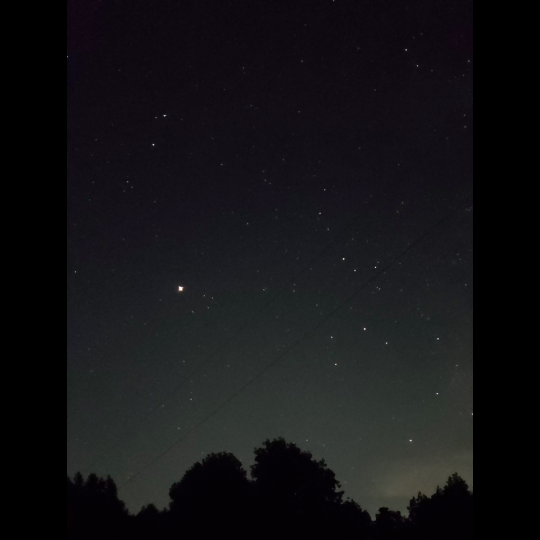
im very grateful for the lessons in photography i was taught in stop motion class because just now they made it possible to photograph the stars with my phone in spite of the camera usually not detecting the light of stars because theyre so dim,,,, enjoy these shiny motherfuckers
ok so if everythings normal, your phone camera should have a manual mode (sometimes called pro mode). in it, change the settings of the shutter lag to 20 seconds, then put the phone down on some stable, plane surface and press the photo button (usually when using your camera, the volume buttons can be used as photo button) and let the phone still for the whole 20 seconds.
(basically the problem with most cameras is that they dont have a very good light sensitivity in the dark, however that doesnt mean they cant detect it at all. the longer the shutter is open, the more light your camera takes in and the more burnt/light your pic will be, so in (literally) dark situations, make the shutter lag longer to get all that light you need! also i said 20 seconds but really you can make it shorter or longer depending on what kinda stuff you want for your stars)
Yes this!
Additionally, adjust your ISO to the highest number (mimics the film used for very low light and low speed images)
And set your shutter speed to the longest time possible (on my phone it’s 10 seconds).
Leave your focus settings on Auto, and if your phone camera has a timer option, turn that on (five seconds is generally enough).
Plan your shot first, then find a place to set your phone down so you can get the image you want. The less light pollution, the better; you’ll pick up FAR more stars in your picture.
Once you know what you want to shoot, tap your screen to “focus” it, then hit the button to take the picture, set your phone down, and back away from the “tripod”. Don’t touch your phone for a good 15 seconds, just to be sure.
You will not be disappointed in the results, let me assure you.
really quick doodle…I was in not pleasant mood sooo it’s werewolf!Stiles I always was sure he would be rather scary…and with eyebrows. overall my husband commented that Stiles suits more to “Penny Dreadful” – then teenWolf.








 shealwaysreads